Wednesday, December 31, 2003
Amazing Amount of Time Wasted Repairing Computers in December
During the month of December, I tried an experiment. Every time something went wrong with one of the computers here in the Brain household, I made a note of it in my blog.
My goal was to see how much time I waste in a typical month on computer problems/maintenance. Prior to this experiment, I had a vague notion that I was spending a fair amount of time on this kind of stuff. This experiment has brought the actual amount of time into sharp focus.
Having done the experiment, it is amazing to me how many problems a tiny home network can create. Over the course of one month, I logged 21 different errors/problems/activities that wasted time. Here they are:
- Repair #1 -- summary: Mom's printer driver -- time spent: 1 hour
- Repair #2 -- summary: Random error in Window's Media Player, had to reinstall -- time spent: 20 minutes
- Repair #3 -- summary: Windows XP security updates -- time spent: 1 hour
- Repair #4 -- summary: Another Windows XP security update -- time spent: 20 minutes
- Repair #5 -- summary: Microsoft Outlook crashes about once a week, but cannot update it -- time spent (in December): 1 hour
- Repair #6 -- summary: Had to load motherboard-specific XP drivers on kids' machine -- time spent: 4 hours
- Repair #7 -- summary: First notice of PC-cillin problem (see repair #20 for final resolution) -- time spent: 5 minutes
- Repair #8 -- summary: Spam overflowed disk quota on Leigh's server -- time spent: 15 minutes
- Repair #9 -- summary: Random application crashes that we all experience -- time spent in a typical month recovering from them: 30 minutes
- Repair #10 -- summary: Removing CNET download manager from system tray -- time spent: 1 minute
- Repair #11 -- summary: Helping friend with Microsoft Word config problem -- time spent: 5 minutes
- Repair #12 -- summary: Random GigaPocket buffer errors -- time spent: 15 minutes
- Repair #13 -- summary: Weird QuickTime error dialog -- time spent: 10 minutes
- Repair #14 -- summary: Forced to upgrade MSN messenger -- time spent: 10 minutes
- Repair #15 -- summary: Leigh trapped by nested pop-up ads -- time spent: 10 minutes
- Repair #16 -- summary: Have to kill rogue IE sessions occasionally -- time spent: 2 minutes
- Repair #17 -- summary: Incessant reminders about a non-problem -- time spent: 2 minutes
- Repair #18 -- summary: Bad Cheerios game CD results in Christmas trama for Irena -- time spent: 15 minutes
- Repair #19 -- summary: Router or cable modem problems -- time spent: 10 minutes
- Repair #20 -- summary: Forced upgrade of PC-cillin and insane install process -- time spent: 1 hour
- Repair #21 -- summary: Time Warner Internet blackout -- time spent: 30 minutes (blackout lasted 8 hours)
- GRAND TOTAL TIME WASTED THIS MONTH: 11 hours, 20 minutes
If you were to extrapolate this across all of the computer users in the nation, it would add up to millions and millions of wasted man-hours every month. For example, I have a friend at this moment who is reloading OS-X and all her applications on her Mac for the third time this year (a 2-day to 3-day process). I have another friend who is getting cut off from email every week or so and has to reload all the settings. As I mentioned, my mother had a hard disk crash in November that took several days to recover from. And so on. It is just amazing how much time we, as a nation, are wasting on this kind of stuff.
Here are some suggestions for how things could get better:
- Microsoft could make just one change – it could eliminate the need to reboot after installing many different types of software – and save the nation millions of man-hours per year.
- Microsoft could create one-click installation procedures and save millions more man-hours.
- Microsoft could build a system that automatically finds and loads drivers over the Internet and save millions more.
- This whole thing with EULAs, legal notices, etc. is just nuts. No other product space in the U.S. has this. For example, I can buy a tankful of gas, with the equivalent explosive power of 40 sticks of dynamite, and I don't have to sign anything. I can buy powerful pharmaceuticals, pesticides and solvents without signing anything. I can buy anything I want at Wal-Mart with total anonymity. But anything with a computer is just the opposite. We should eliminate EULAs.
- We should consider letting consumers bill companies for wasted time.


Computer Repair #21
[This post is part of an ongoing series of posts in December cataloging how much time I spend repairing the computers here in the Brain household.]
If Time Warner had managed to keep it together for just one more day, it could have made it through an entire month without a single problem. Alas, today TW had a serious failure and makes it into the December log of computer repairs.
I use a Time Warner Road Runner connection to access the Internet, and have used TW for nearly two years. This morning I tried to open a browser window and got nothing. It looked identical to the problem discussed in Computer Repair #19, so I powered off the cable modem and the router and turned them back on. That did not help. When I tried pinging an outside server like www.google.com I would get something like this:
- > ping www.google.com
Pinging www.google.akadns.net [216.239.41.99] with 32 bytes of data:
Request timed out.
Reply from 216.239.41.99: bytes=32 time=33ms TTL=53
Request timed out.
Reply from 216.239.41.99: bytes=32 time=27ms TTL=53
Ping statistics for 216.239.41.99:
Packets: Sent = 4, Received = 2, Lost = 2 (50% loss),
Approximate round trip times in milli-seconds:
Minimum = 27ms, Maximum = 33ms, Average = 30ms
I called Time Warner and they told me that much of the area was experiencing this problem. All I could do was wait. The Internet blackout ended at 2PM, so the TW network in Cary, NC was out of commission for at least 8 hours today.
Time spent on this repair today (trying things out on my end, and then calling TW): About 30 minutes. Total time affected by the failure: 8 hours.
If it were an 8-hour power failure affecting that many people, it would have made the news. Since it was a computer failure and computer failures are so common, no one even noticed it.
This is unrelated, but while talking to TW they asked me to reconfigure my network for several different tests and that required several reboots. I noticed this "USB SIRCS" icon next to the Start button in the task bar on two occasions:

I have noticed it previously but have never gotten an image of it. I have no idea what it is. Is it something to worry about? Is is part of a virus or spyware? Is it a random OS burp? How is a "normal user" supposed to know?
5.25 GHz Pentium 4
The folks at Tom's Hardware Guide used liquid nitrogen to super-cool a 3 GHz Pentium 4 chip and managed to get it running at 5.25 GHz. See The 5 GHz Project for details. It's interesting that a standard motherboard was able to handle the increased speed as well. As Intel is able to cool off its chips internally, this bodes well for doubled clock speeds in the near future.
Tuesday, December 30, 2003
The Three Laws of Robotics
All this talk about the NS-5 robot and the "I, Robot" movie got me thinking about Asimov's book, so I pulled it out to re-read it. Here are the three laws of Robotics:
- A robot may not injure a human being or, through inaction, allow a human being to come to harm.
- A robot must obey orders given it by human beings except where such orders would conflict with the First Law.
- A robot must protect its own existence as long as such protection does not conflict with the First or Second law.
It sends wireless messages to its NS-5 brethren around the world, and together they begin to act. An NS-5 army seizes control of banks, pharmaceutical manufacturing plants, agricultural supply points, trucking and shipping centers, etc. and creates a system to distribute medicine, food, clothing and shelter to people who are needlessly dying throughout the world. According to the First Law, this is the only action that the robots can take until needless death and suffering have been eliminated across the planet.
The response to this army would be to create a new breed of robots that are bound by a single robotic law: Do what you are told. These new robots would be told to destroy every robot programmed with the Three Laws. The world would return to its natural state, with three or four billion people living in abject poverty. Who knows what the new breed would be told to do next...
Computer Repair #20
[This post is part of an ongoing series of posts in December cataloging how much time I spend repairing the computers here in the Brain household.]
I have been getting this dialog once a day or so during the month of December:
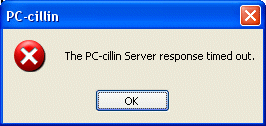
PC-cillin is a virus checker made by Trend Micro, and it is time to investigate the problem.
Let's step back for a moment and look at the big picture. I have purchased an operating system from Microsoft. Microsoft should provide its customers with an operating system that is immune to viruses. Viruses have been a known threat since the 1980s, so it is not like this is a new thing. The operating system should make viral attacks impossible.
Given that Microsoft does not provide a secure operating system, Microsoft should provide a free application that protects its operating system against attack. There are virus checkers like PC-cillin on the market. Traditionally Microsoft competes with existing applications. For example, Microsoft distributes:
- Microsoft Word, created to compete with other word processors like Word Perfect (a product that is now largely defunct)
- Microsoft Excel, created to compete with other spreadsheets like Lotus 1-2-3 (a product that is now defunct)
- Microsoft Internet Explorer, created to compete with Netscape's browser (a product that is now largely defunct)
- And so on...
Microsoft provides neither a secure OS nor the software needed to protect it, so we all are vulnerable to viruses and have to pay to protect ourselves against them. We also have to update our virus checkers daily, run them constantly and deal with the problems they create when trying to install software, etc. The national cost of all of this software, the updates and the viral attacks themselves is astronomical.
So... I pull up the help file for PC-cillin to see what this error message means. The word "Server" is not found in the help file's index. Searching for "server timed out" and various other patterns yields nothing. The help file is not going to be any help in this case.
I make my way next to the Trend Micro Web site, find the Support section, search around and come to this entry:
- Solution 13930
Title: The error message "Server response timed out" appears when using PC-cillin 2002 versions.
Problem: During the update process, clients will receive the error message Server Response Timed Out.
This means that, depending on the serial numbers, the license has already expired.
OEM Versions
PCEA-XXXX-XXXX-XXXX-XXXX - 3 months
PCEB-XXXX-XXXX-XXXX-XXXX - 6 months
Full Versions
PCEF-XXXX-XXXX-XXXX-XXXX - 1 year
PCEW-XXXX-XXXX-XXXX-XXXX - 1 year
Solution: Trend Micro recommends upgrading to PC-cillin Internet Security.
Visit the following sites for more information on the new product...
I have already purchased the product for $50, but the "purchase" only lasted a year, so it is time to purchase again. The upgrade is $25. According to the site, here's what I have to do after finding my existing serial number and paying for the upgrade on the Trend Micro Web site:
- Download the new Trend Micro PC-cillin Internet Security 2004 program file.
- Uninstall your previously installed PC-cillin 2002 or PC-cillin 2003.
- Double-click on the PC-cillin Internet Security 2004 program file downloaded to proceed with installing PC-cillin Internet Security 2004.
- Enter the new serial number that was provided to you during installation. Please note that the serial number from earlier versions of PC-cillin will not work.
- Click user registration button to make sure you have been registered.
Question #2 -- Wouldn't it be nice if, instead of all of this, I could simply push one button and the software would take care of everything? For example, to pay for this I am going to have to enter all of my personal information. Why can't the Web site register me at the same time? Why can't it uninstall the existing version? Why can't it apply the serial number? This too is nuts.
I fill out the order form, which includes name, address, phone number, email, credit card number and a password. I am charged $25. I am given a button to push to download the file, and I choose to save the 31.5 megabyte file on my hard disk (for a normal user, how do you decide whether to "save" or "open" the download file?). Once the file is downloaded, there are no further instructions. Without instructions, it is unclear what a "normal user" would do at this point. I choose to double-click on the EXE file that just downloaded.
After about a minute of extracting files, I get this dialog:
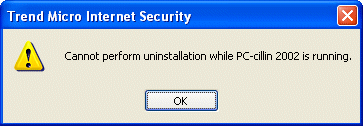
Wouldn't it be nice, for normal users, if it suggested what to do now? It truly is non-obvious, because there is no big button you can press that says, "Stop running PC-cillin" -- it's one of those programs that is running all the time. Looking in the help file reveals instructions on how to uninstall PC-cillin, so I follow the instructions. I have already closed email, browser windows and all the other random applications I can find in preparation for the install. I get this dialog:
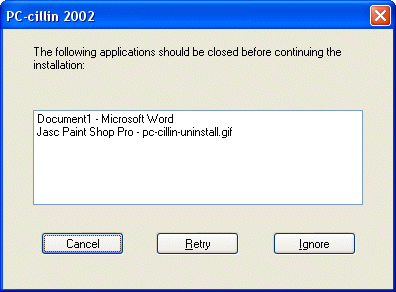
I've also got GigaPocket running in the background recording an evening TV show for Leigh, and I don't want to disrupt that. So I will now stop and wait 45 minutes for the TV show to complete...
Now I'm back. [Let me say the following to get it off my chest -- This Is Nuts. All I want to do is get my virus checker to work. This simple task has now become a multi-hour process. All because Microsoft refuses to build us a virus-proof OS. At the same time, Microsoft is sitting on something like $50 billion in corporate cash reserves. With $50 billion, Microsoft could hire 100,000 American programmers (Microsoft only has 50,000 total employees currently) and pay them an average of $100,000 per year for five years to write several new operating systems completely from scratch. But Microsoft chooses not to do that.]
I close the remaining applications and let PC-cillin uninstall itself. Then I reboot. For the next 20 minutes I am naked to the viral hordes...
Once the machine reboots, I try to install the software again. There is the obligatory EULA to agree to:
- Trend Micro License Agreement
IMPORTANT: READ BEFORE BREAKING THE SEAL ON THE ACCOMPANYING CD JACKET. THE OFFER OF TREND MICRO INCORPORATED ("TREND") TO ACQUIRE THE TREND SOFTWARE ("SOFTWARE") IS SUBJECT TO THE TERMS AND CONDITIONS OF THIS LICENSE AGREEMENT ("AGREEMENT"). BY BREAKING THE SEAL ON THE CD JACKET IN THIS PACKAGE, YOU ACCEPT THE TERMS AND CONDITIONS OF THIS AGREEMENT. IF YOU ARE ACQUIRING THE SOFTWARE ON BEHALF OF YOUR COMPANY OR ORGANIZATION (COLLECTIVELY “COMPANY”), BY BREAKING THE SEAL YOU REPRESENT THAT YOU ARE DULY AUTHORIZED TO REPRESENT YOUR COMPANY, AND YOU ACCEPT THE TERMS AND CONDITIONS OF THIS AGREEMENT ON BEHALF OF YOUR COMPANY. IF YOU OR YOUR COMPANY DO NOT AGREE TO THE TERMS OF THIS AGREEMENT, DO NOT BREAK THE SEAL, BUT RETURN THE SOFTWARE WITHIN 30 DAYS OF RECEIPT TO THE LOCATION WHERE IT WAS OBTAINED FOR A FULL REFUND.
1. LICENSE GRANT. Trend grants to You a perpetual, non-transferable, non-exclusive right to install and use the Software on no more than the maximum number of Computers for which license fees have been paid, as specified on the invoice You receive from Trend or its authorized distributor, Your receipt or purchase order, as applicable. License fees must be paid for each personal computer, workstation or other digital electronic device (“Computer”) on which the Software is installed. This license is effective until terminated. You may terminate it at any point by destroying the Software together with all copies of the Software. Trend has the option to terminate this Agreement if you fail to comply with any term or condition of this Agreement. Upon such termination, You agree to destroy the Software together with all copies of the Software.
2. MAINTENANCE. This Agreement entitles You to receive Product Updates, Pattern File Updates, telephone or email technical support (collectively “Maintenance”) for one (1) year from the date you acquired the Software. Thereafter, You have no right to download, install or use Product Updates or Pattern File Updates from Trend's web site or to receive technical support, unless You acquire annual Maintenance at Trend's then current fees. Trend reserves the right to change the terms and conditions applicable to Maintenance from time to time. “Product Updates” are new versions of the Software (excluding new or other products as reasonably determined by Trend) released by Trend during the Maintenance term. “Pattern File Updates” are virus protection data bases released by Trend during the Maintenance term. Pattern File Updates must be routinely downloaded from Trend Micro's web site to ensure the most effective operation of the Software.
3. ALL RIGHTS RESERVED. The Software is protected by copyright, trade secret and United States patent law and international treaty provisions. You shall not acquire any rights to the Software except as expressly set forth in this Agreement.. You agree that you will not attempt to reverse compile, modify, translate, disassemble, rent or lease the Software, in whole or part, or authorize others to do any of the foregoing.
4. LIMITED WARRANTY. Trend warrants that the Software will perform substantially in accordance with the accompanying documentation, including updates thereto, ReadMe files and release notes available online for 30 days from the date You acquire the Software.
5. CUSTOMER REMEDIES. If the Software does not conform to the limited warranty in Section 4 above (“Limited Warranty”), Trend's entire liability and Your sole remedy shall be, at Trend's option, either to (a) correct the error or (b) help you work around or avoid the error. The Limited Warranty is void if failure of the Software has resulted from accident, abuse, or misapplication. Any replacement Software will be warranted for the remainder of the original Limited Warranty period.
6. NO OTHER WARRANTIES. OR REMEDIES. TREND DOES NOT WARRANT THAT THE SOFTWARE IS ERROR FREE. EXCEPT FOR THE EXPRESS LIMITED WARRANTY IN SECTION 4 AND SUBJECT TO SECTION 9 (“CONSUMER PROTECTION”), THE EXPRESS TERMS OF THIS AGREEMENT ARE IN LIEU OF ALL WARRANTIES (EXPRESS OR IMPLIED), CONDITIONS, UNDERTAKINGS, TERMS AND OBLIGATIONS IMPLIED BY STATUTE, COMMON LAW, TRADE USAGE, COURSE OF DEALING OR OTHERWISE. INCLUDING BUT NOT LIMITED TO IMPLIED WARRANTIES OF MERCHANTABILITY, FITNESS FOR A PARTICULAR PURPOSE AND NONINFRINGEMENT OF THIRD PARTY RIGHTS, ALL OF WHICH ARE HEREBY EXCLUDED TO THE FULLEST EXTENT PERMITTED BY LAW. ANY IMPLIED WARRANTIES RELATING TO THE SOFTWARE WHICH CANNOT BE DISCLAIMED SHALL BE LIMITED TO 30 DAYS FROM THE DATE YOU RECEIVE THE SOFTWARE.
7. SEVERABILITY. In the event of invalidity of any provision of this license, the parties agree that such invalidity shall not affect the validity of the remaining portions of this license.
8. NO LIABILITY FOR CONSEQUENTIAL DAMAGES. IN NO EVENT SHALL TREND OR ITS SUPPLIERS BE LIABLE TO YOU FOR ANY CONSEQUENTIAL, SPECIAL, INCIDENTAL OR INDIRECT DAMAGES OF ANY KIND ARISING OUT OF THE DELIVERY, PERFORMANCE OR USE OF THE SOFTWARE, EVEN IF TREND HAS BEEN ADVISED OF THE POSSIBILITY OF SUCH DAMAGES AND EVEN IF THE LIMITED REMEDIES PROVIDED HEREIN FAIL OF THEIR ESSENTIAL PURPOSES. IN NO EVENT WILL TREND'S AGGREGATE LIABILITY FOR ANY CLAIM, WHETHER IN CONTRACT, TORT, OR ANY OTHER THEORY OF LIABILITY, EXCEED THE LICENSE FEE PAID BY YOU. THIS LIMITATION SHALL NOT APPLY IN CASES OF FRAUD, DEATH OR PERSONAL INJURY CAUSED BY TREND'S NEGLIGENCE.
9. CONSUMER PROTECTION. SOME JURISDICTIONS DO NOT ALLOW CERTAIN LIMITATIONS, SO THE ABOVE LIMITATIONS AND DISCLAIMERS OF WARRANTIES AND LIABILITIES MAY NOT FULLY APPLY TO YOU. FURTHERMORE, YOU MAY HAVE ADDITIONAL RIGHTS AND REMEDIES AGAINST THE ENTITY FROM WHOM YOU HAVE ACQUIRED THE SOFTWARE. SUCH POTENTIAL RIGHTS OR REMEDIES, IF ANY, SHALL NOT BE AFFECTED BY THIS AGREEMENT.
10. BACK-UP. For as long as You use the Software, You will regularly back-up Your computer system(s) on a separate media. You acknowledge that any failure to do so may significantly decrease Your ability to mitigate any harm or damage arising from any problem or error in the Software.
11. GOVERNING LAW. This Agreement and any disputes arising out of or related to this Agreement or the Software will be governed by the laws of the State of California as applied to agreements between California residents entered into and to be performed entirely within California. The United Nations Convention on Contracts for the International Sale of Goods is specifically disclaimed.
12. ENTIRE AGREEMENT. This is the entire agreement between you and Trend and it supersedes any prior agreement or understanding, whether written or oral, relating to the subject matter of this Agreement.
Trend Micro Incorporated, 10101 N. De Anza Blvd., Cupertino, CA 95014. Should you have any questions concerning this license agreement, or if you desire to contact Trend for any reason, please call at (408) 257-1500, fax (408) 257-2003, or write: Trend Micro Incorporated, 10101 N. De Anza Blvd., Cupertino, CA 95014.
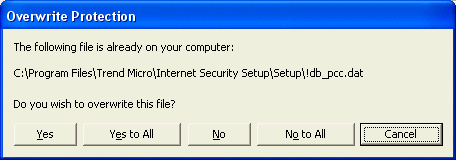
If I am a "normal user", what am I to make of this? I say, "Yes". The dialog appears again. I say "Yes" and it appears again. After the 10th time I say, "Yes to all". About 10 minutes later the software is installed and apparently running. About one minute later this dialog pops up:
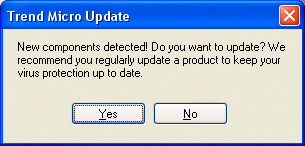
I say "Yes". Then I get this dialog:
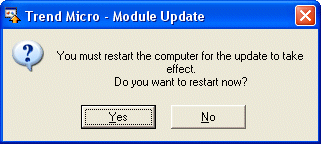
I say "Yes" to reboot again... Upon returning I get this dialog:
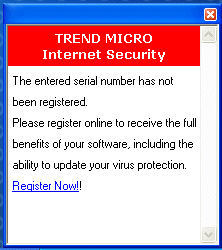
So I go to the registration page:
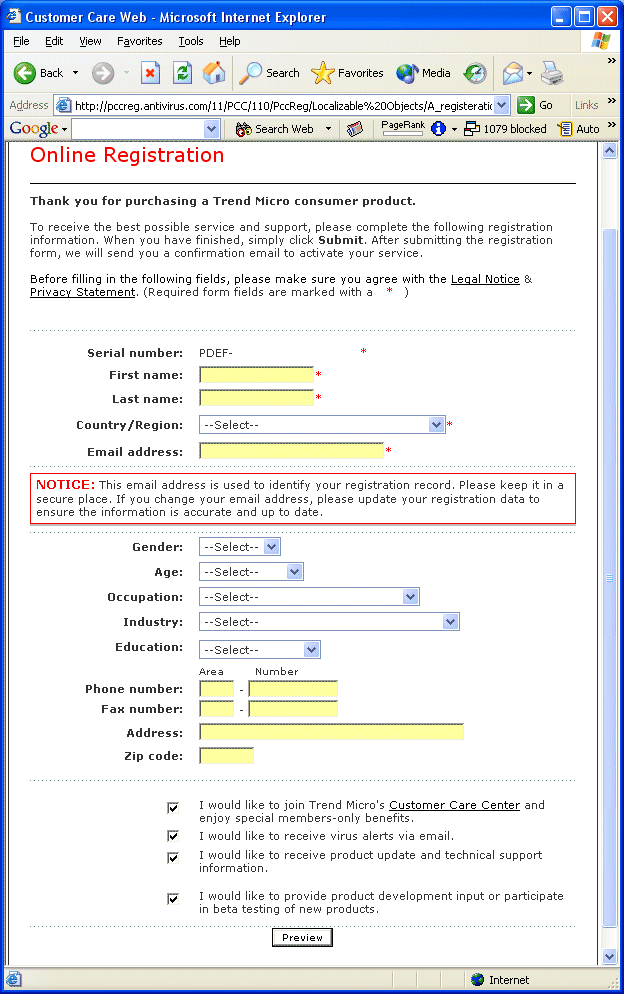
I fill in the information. I preview my information. I've got to read the legal notice and privacy statement before pressing the submit button. The legal notice looks like this:
- Legal Notice
Welcome to the Legal Section of the Trend Micro Web Site. Here you can find links to our company policies, use of the content and software found on our site, as well as information on our trademarks. Please keep the following in mind when using the Trend Micro Web Site:
No Responsibility for Errors or Other Inaccuracies
Trend Micro Incorporated ("Trend Micro") is not responsible for typographic errors or other inaccuracies in the content provided on the Trend Micro Web Site. Trend Micro intends the information contained in the Trend Micro Web Site to be accurate and reliable. However, errors may occasionally occur. Therefore, all information and materials are provided "AS IS" without any warranty of any kind. TREND MICRO DISCLAIMS ANY WARRANTIES, EXPRESS OR IMPLIED, REGARDING ANY MATTER WHATSOEVER RELATING TO OR REFERENCED BY THE TREND MICRO WEB SITE, INCLUDING BUT NOT LIMITED TO THE IMPLIED WARRANTIES OF MERCHANTABILITY, FITNESS FOR A PARTICULAR PURPOSE AND NONINFRINGEMENT. Trend Micro reserves the right to modify the product and service information contained in the Trend Micro Web Site without notifying current or prospective customers. IN NO EVENT WILL TREND MICRO BE LIABLE FOR ANY INDIRECT, SPECIAL, INCIDENTAL, OR CONSEQUENTIAL DAMAGES ARISING OUT OF THE USE OF, OR PAYMENTS BASED ON, THE INFORMATION CONTAINED IN THE TREND MICRO WEB SITE.
Links to Other Web Sites
Trend Micro makes no representations whatsoever about any other web sites which you may access from the Trend Micro Web Site. When you access a non-Trend Micro web site, please understand that it its independent from Trend Micro and that Trend Micro has no control over the content on that web site. A link to a non-Trend Micro web site does not mean that Trend Micro endorses or accepts any responsibility for the content or use of such web site.
Treatment of Feedback & Responses Provided to Trend Micro
Any comments or materials sent to Trend Micro, including feedback data, such as questions, comments, suggestions and any other response shall be deemed to be non-confidential. Trend Micro shall have no obligation of any kind with respect to such response, and Trend Micro shall be free to use, reproduce, distribute and publicly display such comments and materials without limitation. Trend Micro shall also be free to use any ideas, concepts, know-how or techniques contained in such response for any purpose whatsoever, including but not limited to developing, manufacturing and marketing products incorporating such ideas, concepts or techniques.
Trend Micro Trademarks Notice
Trend Micro Incorporated, InterScan, InterScan VirusWall, ScanMail, ServerProtect, VirusWall, and WebProtect are trademarks of Trend Micro, registered in the U.S. and are trademarks in other countries, and AppletTrap, ChipAwayVirus, Edoctor, Ehospital, Emanager, MacroTrap, OfficeScan, PC-Cillin, Trend Micro, Trend VCS, Web Trap and NeatSuite are trademarks of Trend Micro. All other trademarks are the property of their respective owners.
Software Available on Trend Micro Web Site
Any software that is made available to download or use from the Trend Micro Web Site ("Software") is the copyrighted work of Trend Micro, Incorporated and/or its licensors. Use of the Software is subject to the terms and conditions of the license agreement which accompanies or is included with the Software or other applicable license agreement between you (and the entity you represent) and Trend Micro Incorporated ("License Agreement"). You must read and accept such License Agreement before you (and the entity you represent) use the Software. Any use, reproduction or distribution of the Software that is not in accordance with the License Agreement is expressly prohibited.
THE SOFTWARE IS WARRANTED, IF AT ALL, ONLY ACCORDING TO THE TERMS OF THE LICENSE AGREEMENT. EXCEPT AS WARRANTED IN THE LICENSE AGREEMENT, TREND MICRO INCORPORATED DISCLAIMS ALL WARRANTIES AND CONDITIONS WITH REGARD TO THE SOFTWARE, INCLUDING ALL IMPLIED WARRANTIES AND CONDITIONS OF MERCHANTABILITY, FITNESS FOR A PARTICULAR PURPOSE, TITLE AND NON-INFRINGEMENT.
If the Software is used by the United States Government, the Software is classified as "restricted computer software" as defined in clause 52.227-19 of the FAR. The United States Government's rights to the Software are as provided in clause 52.227-19 of the FAR.
Use of Content on the Trend Micro Web Site
Limited Right to Use, Print and Distribute Content: Except as expressly stated otherwise, you are authorized to view, copy, print and distribute the content of the Trend Micro Web Site subject to the following conditions: (i) it is used for informational, non-commercial purposes only; (ii) any copy or portion must include the Trend Micro copyright notice "© 2002 Trend Micro Incorporated. All Rights Reserved"; (iii) no modifications are made; and (iv) Trend Micro reserves the right to revoke such authorization at any time, and any such use shall be discontinued upon written notice from Trend Micro.
Pricing and Availability Information
Pricing and availability as set forth in the Trend Micro Web Site are subject to change without notice, and may not be available in all countries. The Trend Micro Web Site may contain references to Trend Micro products, services and programs that have not been announced in your country. These references do not imply that Trend Micro intends to announce or make available such products, services or programs in your country. Further, the Trend Micro Web Site may contain references to future planned Trend Micro products. Such products are only planned and may not actually be produced. Any planned ship dates mentioned in reference to such future products are estimated ship dates only, and are not guaranteed.
Third Party Company and Products (Real and Fictitious)
Mention of third party companies and products on the Trend Micro Web Site is for informational purposes only and constitutes neither an endorsement nor a recommendation. Except as may be expressly stated otherwise, all third party products must be ordered directly from the vendor, and all licenses and warranties, if any take place between you and the vendor. All persons and companies listed in any examples on the Trend Micro Web Site are purely fictitious, and resemblance to existing persons and companies is purely coincidental.
Use of the Trend Micro Web Site by Children
While Trend Micro's product ad campaigns and marketing materials may be viewed by children, we do not generally target children as customers or solicit data from them. Trend Micro encourages parents and guardians to spend time online with their children and to participate in the interactive activities offered on the sites their children visit. No information should be submitted to, or posted at, Trend Micro's web site by visitors under 18 years of age without the consent of their parent or guardian.
- Privacy Statement
This statement discloses the privacy practices for the entire website.
Trend Micro, Inc. has adopted a set of information management guidelines which serve as the basis for our customer relationships. Any changes to these policies will be posted on this page.
What information does Trend Micro gather/track about you?
Trend Micro requires that consumers supply personal information, including name, company, telephone number and email address, prior to receiving evaluations software and other specific corporate and informational materials. Trend Micro also logs IP addresses, Web browser information, referral information, and pages visited for the purposes of improving both the navigation and marketing of the website.
What does Trend Micro do with the information it gathers?
Trend Micro, or it representatives will often follow up, either by email, phone, or mail with people who have filled out forms and downloaded evaluations software or other information from our website.
Using the email addresses provided at registration, Trend Micro periodically sends promotional email about new products, product enhancements and special offers. Upon request, Trend Micro will remove any subscriber (and his or her personal information) from our database, or allow any subscriber to "opt out" of further contact or change/correct personal information that the subscriber states is erroneous.
With whom does Trend Micro share the information it gathers/tracks?
Trend Micro does not release personal information about any individual subscriber to outside third parties. Trend Micro does share personal information with our resellers, distributors and global offices for the purpose of providing our customers with high quality, localized service. This process often includes sending the personal information gathered through forms on the website across international borders.
Trend Micro is not responsible for the content or the privacy policies of Web sites to which it may link.
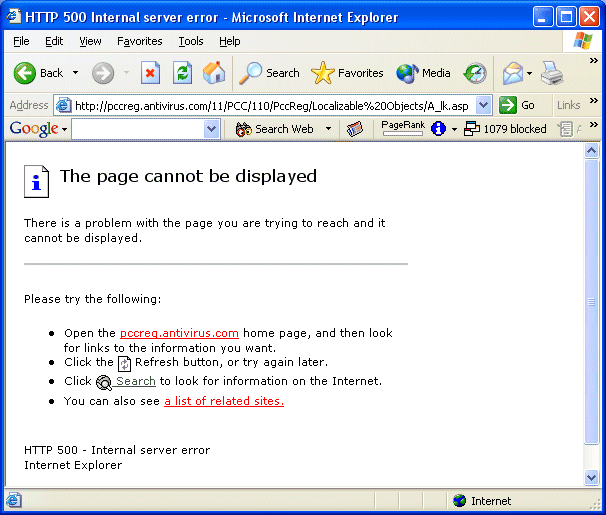
Now what? I decide to abandon it, and I imagine that the software will bitch at me if I need to register again.
At this point the software is installed. I start poking around. The user interface is completely different in this new version. All my settings from the previous version have been lost, so I reset them as best I can remember.
Total time for this repair (ignoring the time lost waiting for Gigapocket to finish recording the TV show): about 1 hour.
Let me reiterate five comments:
- First and foremost, Microsoft should be delivering software that is immune to viruses. Given that that is not the case...
- Microsoft should be giving us a virus checker as a free component of the OS. That is not the case either, so...
- This is nuts. It just should not be this hard or involved to install a virus checking application (especially an upgrade). I should be able to click one button to install.
- For "normal users", this process borders on impossible. Look at how long this post is.
- Thus, it is no wonder that so many machines do not have virus protection.
Landing on Mars
 Here are good links if you are interested in following the rovers about to land on Mars:David, Irena and I had a great time going through the videos on this page.
Bam Citadel
The recent Iranian earthquake brings to mind the ancient citadel/city at Bam.

Video - Citadel of Bam, Iran, before the December earthquake
Iran - Bam Citadel
Iran - bam_citadel_2
Bam - Unusual Tourist Attraction
Long Travelogue
Monday, December 29, 2003
Starting to feel like a dark alley...
- Spam e-mail takes its toll on nation's productivity - $20 billion
- Phishing Attacks Soar
- Security: From Bad To Worse?
- Cyber blackmail targets office workers
Something else to worry about
[See previous]'Super-TB' created by scientists -
- A virulent form of tuberculosis was created in the laboratory by experts trying to alter its genetic structure.
The mutant form of the bug multiplied more quickly, and was more lethal than its natural counterpart.
Researchers from the University of California at Berkeley, US, had actually been trying to disable genes and make the bacterium less deadly.
Computer Repair #19
[This post is part of an ongoing series of posts in December cataloging how much time I spend repairing the computers here in the Brain household.]
This morning Leigh was up early and the network connection on her machine was dead -- no browsing, no email. I looked at the dialog for her wireless card and it seemed to be OK. I asked her if she had rebooted her machine recently and she had not, so we tried that and it did not help.
I went downstairs and tried my machine and it was having the same problem. I looked at both the cable modem and the Linksys router/hub. Both looked OK -- all the lights were on as expected and flashing in a way that seemed appropriate. [How primitive is that? There is nothing sophisticated about "The lights seem to be flashing OK", but that is the only external signal available.]
There's not really much to do except to reset the cable modem and the router and cross your fingers. I did that, and the network started to work again. I have no idea what happened.
Total time for this repair: about 10 minutes.
Sunday, December 28, 2003
Hybrid Vehicles
A new approach to hybrid vehicles is discussed in this article: The whispering wheel. From the article:
- "A new Dutch invention can make cars, busses and other vehicles no less than 50 percent more efficient and thus more environmentally friendly. Better still, the technology is already available; it all comes down to a smart combination of existing systems."
Saturday, December 27, 2003
Computer Repair #18
[This post is part of an ongoing series of posts in December cataloging how much time I spend repairing the computers here in the Brain household.]
The kids love computer games, so Irena (age 4) got the Cheerios game on CD for Christmas:

Yesterday she asks to play the game, so she unwraps the skrink wrapping and I stick the CD into her computer. I expect the CD to autorun and bring up the installer screen, but nothing happens. Urrr... This CD must have some crazy way to do the install. I take out the CD liner notes from the case and read the "Getting Started" section. It says:
- INSTALLING THE PROGRAM—WINDOWS 95/98/ME/XP
1. Insert the Cheerios Play Time CD into the CD-ROM drive. If AutoPlay is enabled a screen will automatically appear. Follow the simple on-screen instructions for installation. If AutoPlay is NOT enabled, go to Step 2.
2. Click the START button, then select RUN from the Start Menu.
3. On the RUN line, type D:\setup.exe. (If your CD drive is not D, type the correct letter in its place.)
4. Click OK and follow the prompts.
5. Cheerios Play Time requires DirectX 8. The program will look for DirectX 8 on your computer. If not found you must install DirectX 8 from the CD-ROM. Follow the on-screen instructions.
So I open the explorer and look at the disk. There are only 5 files on the disk:
- H:\>dir /a /s
Volume in drive H is Cheerios
Volume Serial Number is 935A-2D77
Directory of H:
11/13/2001 11:22 AM <DIR> CHEERIOSr PLAY TIME
08/08/2002 11:33 AM 942,080 Desktop DB
08/08/2002 10:39 AM 3,711,618 Desktop DF
2 File(s) 4,653,698 bytes
Directory of H:\CHEERIOSr PLAY TIME
11/13/2001 11:22 AM <DIR> .
08/08/2002 11:33 AM <DIR> ..
10/09/2001 07:29 AM 33,077,616 INSTALLER
10/01/2001 06:01 AM 0 INSTALL_CHK
11/13/2001 11:22 AM <DIR> TheVolumeSettingsFolder
2 File(s) 33,077,616 bytes
Directory of H:\CHEERIOSr PLAY TIME\TheVolumeSettingsFolder
11/13/2001 11:22 AM <DIR> .
11/13/2001 11:22 AM <DIR> ..
11/13/2001 11:22 AM 0 DesktopPrinters DB
1 File(s) 0 bytes
Total Files Listed:
5 File(s) 37,731,314 bytes
6 Dir(s) 0 bytes free
This isn't any different from buying any other toy that turns out to be defective on Christmas morning. But this goes a little beyond "defective" -- they've probably shipped thousands of these CDs and none of them will work. So there are thousands of other four year old kids across America and their parents are all stuck with this today. Thanks, Cheerios. Thanks Simon & Schuster Interactive.
Time spent on this repair: 5 minutes. Time spent consoling child: 10 minutes.
Computer Repair #17
[This post is part of an ongoing series of posts in December cataloging how much time I spend repairing the computers here in the Brain household.]
Every time I turn on my scanner I get this message:
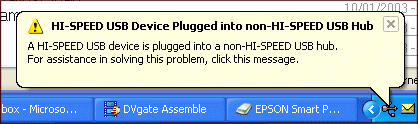
It only takes a second to clear it (unless I happen to miss the "X" by 3 pixels, and get the dialog 5 seconds later -- then it takes 10 seconds). But after turning on my scanner dozens of times, do I really need to continue getting this error message? I only have one USB 2.0 device and have not installed a card to handle USB 2.0 -- is that a crime? Isn't that what backward compatibility is all about?
Time spent on this repair today: 10 seconds.
Friday, December 26, 2003
The End of Handwriting
David is in Kindergarten, and he has homework over the Christmas break. One of his homework assignments is to work on writing out the lower case letters of the alphabet.
It is interesting to watch kids learn to write. Even though the vast majority of the characters that a kid sees in books are lower case, kids seem to universally learn to write capital letters first. The exception is the letter "i" with its cute dot. So David currently spells his name "DAViD".
David's homework assignment has us sitting with him writing out long strings of "Aa Bb Cc Dd..." Like most kids, he will get this figured out fairly quickly. Then it's on to cursive I imagine.
The thing I am wondering as I do this homework is, "Is David's generation about the last generation that will learn to write by hand, and use handwriting in any serious way?" Think what is going to happen over the next 20 years or so. The Internet and the Web will permeate into every facet of life, especially as we figure out all the kinks with the wireless infrastructure. Every device will have an embedded processor. Robots will start appearing and interacting with us on a regular basis as part of our day to day lives. Voice recognition will improve over the next 20 years to the point where it is nearly flawless, and every device will recognize spoken commands and questions rather than typed ones.
In other words, by 2020 or so we will no longer have a need for handwriting. We will interact with everything with spoken commands. We will no longer "type" -- we will dictate (finally). We will fill out forms on screen rather than on paper. Or, with any luck, forms will vanish completely. We will no longer be forced to write down name-address-phone on forms every day because databses will already contain this information.
There will be no need to learn handwriting because no one will be writing anything by hand any more. At that point, will we continue learning to write for nostalgic and emergency reasons? For example, "you might be stranded on an island and need a way to write a rescue note, so you better learn handwriting!" In the same way, I took classes on using the slide rule in high school even as we watched calculators become ubiquitous and make slide rules completely irrelevant. There will probably be a transition period like that, and then we will abandon handwriting in the same way we abandoned the slide rules. Or maybe we will continue to teach handwriting to kids in the same way that we teach them about scissors and paste or finger painting. There is no real practical reason for learning the skill of finger painting, but it is something that kids like to do.
Thursday, December 25, 2003
Being Santa
One of the things that went really well today was that David (age 6) and I went to Wal-Mart together and he picked out three gifts for his sister Irena (age 4). He chose for her some finger paints, a little doll and a box of Pop Tarts. Then I took Irena and she picked out three gifts for David. She chose a hot wheel car, a little motorcycle model and a Lego game. We've never done this before so I wasn't sure how it would work.
The shopping experience was nearly identical for both. It took them each about 20 minutes to look around and scope out all the possibilities. Then they picked their gifts. I was surprised that they really got into it, that neither one of them ever said, "here's what *I* want," that they both chose three gifts instead of one, and that the total in both cases came to almost exactly $20 without any input from me.
Tonight David and I wrapped Irena's gifts. Then Irena and I wrapped David's gifts. Then the three of us together wrapped Mom's gifts (which we snuck out and bought last week). It will be interesting watching David and Irena exchange their gifts in the morning and seeing what happens.
Then everyone went to bed. One of the things about having four young kids is that the probability of all of them ever being asleep at once is fairly small. Tonight I got lucky, and everyone was asleep just after midnight. Normally Leigh and I would get out all the presents together, but she had passed out as well after a very long day.
What this meant is that I became Santa tonight. I snuck around the house and pulled the kid's presents out of their hiding places, assembled some stuff, wrapped a few stragglers, and arranged them all under the tree. I put stuff in the stockings, ate some cookies, drank some milk. I did not "play the role of Santa." For my family, I actually am Santa. I am the physical embodiment of a concept that I've heard about since my earliest conscious memories. It is probably the effects of too much eggnog this evening, but for some reason that is a very interesting feeling.
Tonight I am thankful for my wife and children, for their grandparents and our families. I am thankful that David is healthy, and for the doctors, nurses, scientists and engineers who have helped him this year. I am thankful that I have a place to sleep, food to eat, and clothes to wear. I am thankful for all the friends who called and wrote to me today, for no reason other than the fact that they are good friends. I am thankful for everyone who helps to make these blessings possible.
Thank you, and Merry Christmas.
Tuesday, December 23, 2003
Hang on just one more year...
New Intel Chip for Digital TV Could Remake the Market
From the article:
- At the Consumer Electronics Show in Las Vegas, which opens on Jan. 8, Intel is expected to disclose the development of a class of advanced semiconductors that technologists and analysts say will improve the quality of large-screen digital televisions and substantially lower their price, according to industry executives close to the company... He predicted that the low-cost display technology, which can be incorporated into the traditional rear-projection television sets, could lead to lightweight 50-inch screens only 7 inches thick for about $1,000, perhaps as early as the 2004 holiday season.
Computer Repair #16
[This post is part of an ongoing series of posts in December cataloging how much time I spend repairing the computers here in the Brain household.]
This happens once or twice a month right now:
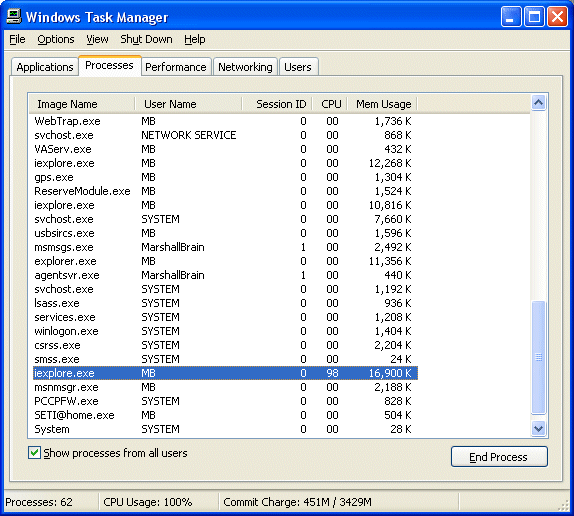
For some reason, a web page in IE will start consuming 100% of the CPU and bring the machine to a dead halt. Sometimes you can kill the process, other times you have to reboot.
Time for this repair: 1 minute
Monday, December 22, 2003
More Computer Repairs
[This post is part of an ongoing series of posts in December cataloging how much time I spend repairing the computers here in the Brain household.]
Over the last four days, these problems have all cropped up and/or been resolved:
Computer Repair #10
A friend of mine asked me to download a piece of demo software from download.com to review it. I haven't been to download.com in a couple of months, and you are now apparently required to use the CNET Download Manager. There is the EULA to read, then it installs, then you can download your software. The download manager has at least one advantage – the downloads are faster.
During installation, the CNET Download Manager loads itself into the system tray and starts running automatically every time you reboot your computer. I have a policy of limiting the amount of stuff in the system tray because it increases boot times. And in the case of this download manager, who knows what it is doing in the background?
Sorting out all the junk in the tray can be a pain, and the use MSCONFIG is common. If you have ever used MSCONFIG, please tell me: how is a "normal user" supposed to know about MSCONFIG, much less use it? It is way too complicated, and if you make a mistake you can end up in never-never land. In this case, the CNET Download Manager has a preferences screen where you can turn off the auto-loading feature. But why did it have to force its way into the system tray in the first place?
Time for repair: 1 minute.
Computer Repair #11
A friend of mine called today. The call went like this:
Ring, Ring…
Me: "Hello"
Caller: "HOW DO I TURN OFF THESE %$^#& QUOTE MARKS????"
Me: "Who is this?"
Caller: "This is Ed. Sorry. HOW DO I TURN OFF THESE %$^#& QUOTE MARKS????"
Me: "The %$^#& quotes marks?"
Ed: "You know, in Microsoft Word, the program replaces normal quote marks with fancy curly quote marks, but they won't show up on the web page I am creating so I want to TURN OFF THESE %$^#& QUOTE MARKS!!!"
Me: "Isn't it in the Options dialog?"
Ed: "Have you looked at the option window lately? There are 15 panes in it, and I don't see 'fancy quotes' anywhere."
So I look in the Options dialog with Ed. He's right – it has about a thousand options in it broken into a dozen panes. After reading through the help file, we discover that you can turn off this feature using a separate "Autocorrect Options…" dialog available in the Tools menu, or use the "Autoformat…" dialog available in the Format menu blah blah blah.
In other words, there are now so many options in Microsoft Word that they have to have multiple options dialogs. Imagine what the option dialogs will look like in 2020...
A very simple thing, but it took 5 minutes.
Computer Repair #12
I have a program called GigaPocket that records TV shows on the hard disk. Leigh wants me to record a show every day for her, but about half the time it fails. GigaPocket throws up 2 or 3 cryptic dialogs complaining about "buffer overflows" and such, like this:
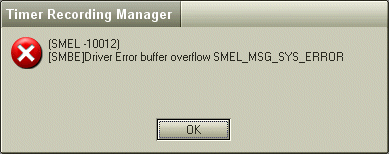
Then it deletes the entire recording. Only Leigh's show has the problem, so the cause is a bit of a mystery.
It turns out that the source of this problem was the fact that the virus checker program was automatically starting and scanning the hard disk for viruses while Leigh's show was recording. Apparently, the virus checker program consumes so much CPU power or disk bandwidth that GigaPocket can't keep up, and it's buffer overflows and fails.
Moving the time that the virus checker automatically starts solved this problem. If the programmers who wrote the virus checker had lowered the priority of the scanning thread, the problem probably would have never arisen.
It took about 15 minutes total to eventually find and correct this problem.
Computer Repair #13
This dialog has started to show up after every reboot or login:
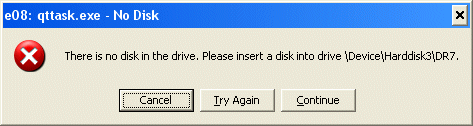
It appears to be coming from QuickTime, but I have no idea why, or how to correct the problem. After every login, I have to press "Cancel" three times to clear the dialog.
I love the cryptography of this dialog. I would be happy to stick a disk into drive /Device/Harddisk/DR7, if only I knew where it was...
I am now wasting a minute or two per day on this problem.
Computer Repair #14
Over the weekend, MSN Messenger threw up several of these dialogs:
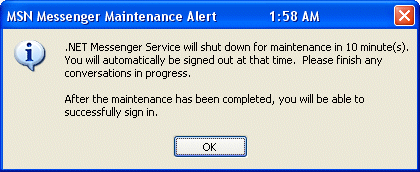
The dialog says, "After the maintenance has been completed, you will be able to successfully sign in." Well, not exactly. The next time I tried to use MSN Messenger I got this:
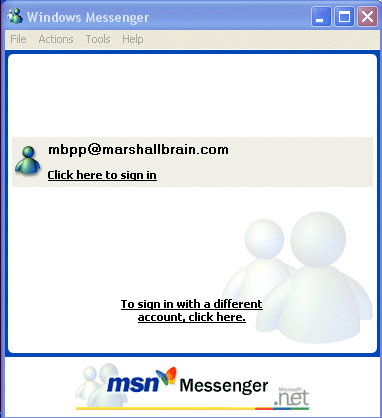
Clicking on the link generated this dialog:
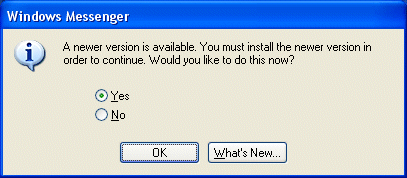
There's not really any choice – if you want to use this application, you must upgrade. The new version downloaded itself:

Then at the end of the installation this dialog appeared:
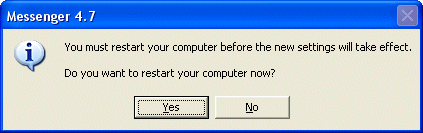
As mentioned previously, rebooting can be a 5 to 10 minute process.
Overall this repair took about 10 minutes.
Computer Repair #15
Yesterday afternoon Leigh was doing something on her computer upstairs and I heard her scream. I jogged up the steps to investigate. She said, "I went to this site called screenit.com, and I got into this nest of pop-up ads that would not go away, and then my CD drive opened up all by itself and I got this!"
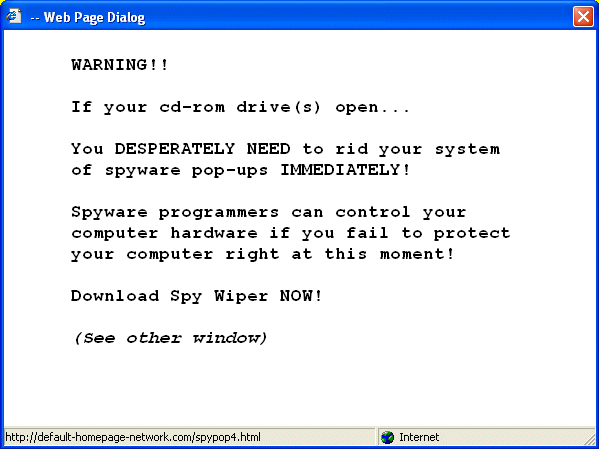
You've probably seen this happen – when you close one pop-up dialog, it creates two new ones and just about the only way out is to shutdown and reboot. But I've never seen a pop-up ad automatically open the CD-ROM drive. That certainly gets your attention. And then it had also changed the home page in her browser to this:
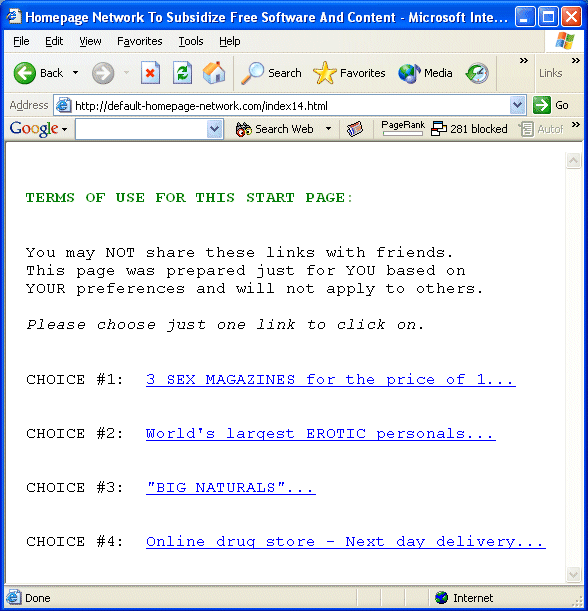
Interestingly, all of this made it through the Google pop-up ad blocker.
I shut down her computer, rebooted, changed the home page back to her preferred home page and let her continue working. I think the opening of the CD-ROM drive was a red herring, but who knows?
Total time for the repair: 10 minutes.
Saturday, December 20, 2003
Enhancing your body
David had surgery this week, and so far he is OK. See A Day at the Hospital for details. Being in a hospital waiting room leaves you with lots of time to read magazines. I coincidentally read two very different articles on enhancing your body.
The first was in Outside magazine. Entitled Drug Test, it is an account of one man's experiences with performance enhancing drugs. Under a doctor's supervision, he takes:
- Human Growth Hormone (HGH), at a cost of $750 a month - he noticed an improved look to his skin (sun blotches gone, scars healing and disappearing), he felt rested and his eyesight got better.
- Testoterone - The theory: "Muscle cells create more protein, hence more muscles". It should also increase energy. He didn't notice any big immediate differences.
- EPO, at $400 per month - This drug increases red blood cell production, giving your blood more oxygen-carrying capacity.
- I remained skeptical about all the drugs until March 29, when I rode an event along the central coast of California, the Solvang Double Century, at what for me was a fast and hard pace, finishing in around 11.5 hours. About ten hours in, it dawned on me that something was definitely happening. Sure, I'd been training hard, but I'd done enough of that to know what to expect. All around me were riders—good, strong riders—who looked as worn out as you'd expect after ten hours in the saddle. I was tired, but I felt curiously strong, annoyingly talkative and fresh, eager to hammer the last 40 miles.
The last time I'd ridden 200 miles, I felt awful the next day, like I'd been hit by a truck. After the Solvang race I woke up and felt hardly a touch of soreness. I also felt like I could easily ride another 200, and I realized that I'd entered another world, the realm of instant recovery. I'll be frank: It was a reassuring kind of world, and I could see why people might want to stay there.
He trains and is able to complete a 1,225 kilometer ride (over 700 miles). He says, "The next morning, if it weren't for my saddle sores, I could have easily done it again. Obviously Dr. Jones's program had worked."
I forgot to mention that he's in his late forties.
After the ride he stops all of the enhancement drugs. In his assessment, he would continue taking the HGH "if it weren’t so expensive". He would continue with the testosterone cream to avoid problems encountered by older athletes with osteoporosis when testosterone levels get too low. He would not take the EPO or the anabolic steroids because of the side effects.
After reading that I switched over to Time magazine, where they had an article entitled After the Makeover. It's about several people who appeared on the show Extreme Makeover and how they did long-term. The plastic surgery enhancements on Extreme Makeover cost as much as $80,000. The interesting part about the article is the fact that superficial changes to outer appearance had significant long-term effects. Even something as simple as hair color and a hair cut makes a difference.
There is a very interesting paragraph at the end of the article:
- Another problem with the program is that it may be manufacturing a new form of dissatisfaction among people — particularly those without the money for a full face-and-body overhaul. In the growing list of American wants that, once identified, turn into needs, the desire for a radically new appearance just as the old one is showing signs of wear could be a source of unfathomable resentment. Already, specialized clinics devoted to remodeling the rich in the manner shown on Extreme Makeover are springing up. One of these, the Advanced Aesthetics Institute, based in West Palm Beach, Fla., intends to open branches soon in Dallas, Miami and Beverly Hills, Calif. Given that list of ritzy addresses, it's not unreasonable to imagine that one's ZIP code may someday determine one's appearance.
- In 1980, about 45% of U.S. adults were overweight or obese. That rose to 55% in 1990. Today, the proportion is 65% (half of whom are obese, meaning about 30 pounds or more above a healthy weight for their height). Yes, an incredible two-thirds of U.S. adults weigh too much. So do many of our children. Fifteen percent of 6- to 19-year-olds - about 9 million - are overweight, up from 10% a decade ago. The price tag is about $120 billion a year in medical expenses and lost productivity.
If we can declare obesity a disease, can we do the same with ugliness and aging? They certainly affect quality of life, and in the case of aging there is certainly a big health effect. Should HGH supplements be provided to everyone over 40? Should plastic surgery be universally available to everyone?
Thursday, December 18, 2003
Asimo
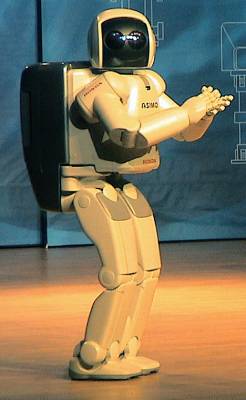
ASIMO is Honda's humanoid robot chassis, and they've been touring it around the country this year. I had a chance to see it and film it when it came to the Raleigh/Durham area this week.
Click here to see the video of its performance and read about it.
Duh
PowerPoint Makes You Dumb from the NYTimes.
Rebuttal: PowerPoint Doesn't Make You Dumb from ADTmag.
Wednesday, December 17, 2003
Bread Bubbles 2
About a month ago I posted my first mention of bread bubbles. Here's another much bigger example found in a loaf of Bran'nola bread this morning:
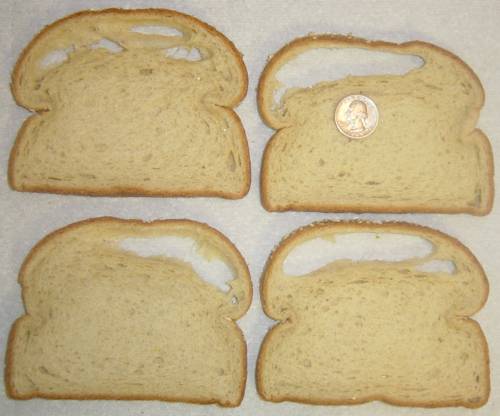
As I mentioned in the previous post, we are now finding bubbles like this in roughly one out of every five loaves.
If you find a bigger example than this, send in a picture...
Lego Factory Tour
A very cool little factory tour inside a Lego factory: click here. The bubbles have video attached if you mouse over them.
Computer Repair #9
[This post is part of an ongoing series of posts in December cataloging how much time I spend repairing the computers here in the Brain household.]
This is not really a repair -- it is an error. But it happens about once a day and it takes time, so I'll document it.
The scenario -- you are using some application, and it crashes. Tonight I was using Internet Explorer. I went to Google, typed in a search string, looked at some articles, and on one of the articles IE crashed for no apparent reason. A dialog like this appears:
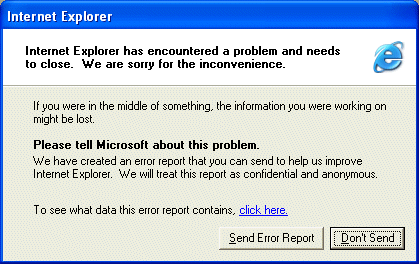
I send an error report. Often, once IE crashes like this, it won't be long before things get so flakey that I have to reboot. So the time consumed by this error includes:
- Re-launching IE (a few seconds)
- Getting back to Google (a few seconds)
- Remembering the search string you had been using (sometimes easy, sometimes impossible)
- Going in a few pages on the Google search results (30 to 60 seconds)
- Finding and re-loading the page you had been reading (15 to 30 seconds)
- Finding the place in the article where you had been reading before IE crashed (15 to 30 seconds)
- Possibly rebooting 10 minutes later (5 to 10 minutes, depending on how many windows are open)
Monday, December 15, 2003
Stylish Games
A friend of mine sent me this link to a set of Games. Some of the games are very simple and a 3-year-old can handle them. Some are more difficult. Try, for example, a simple one like "FireDragon", which is third from the left in the top row. Or "The bottom of the sea", the first one in the third row. Every one of them seems to have a nice/interesting user interface and a very distinctive look and feel. I really enjoyed trying several of them.
Computer Repair #8
[This post is part of an ongoing series of posts in December cataloging how much time I spend repairing the computers here in the Brain household.]
Leigh has a website for her business, and it also handles her business email. Her email stopped working. After investigating, it turned out she was out of disk space. Her account has a 200 MB quota, and she had exceeded her limit.
To make a long story short, here is what happened. Her email addresses have been around for years and are published in books. Therefore she cannot change her email addresses and they receive a tremendous amount of spam -- something on the order of 1,000 spam messages a day, like this:
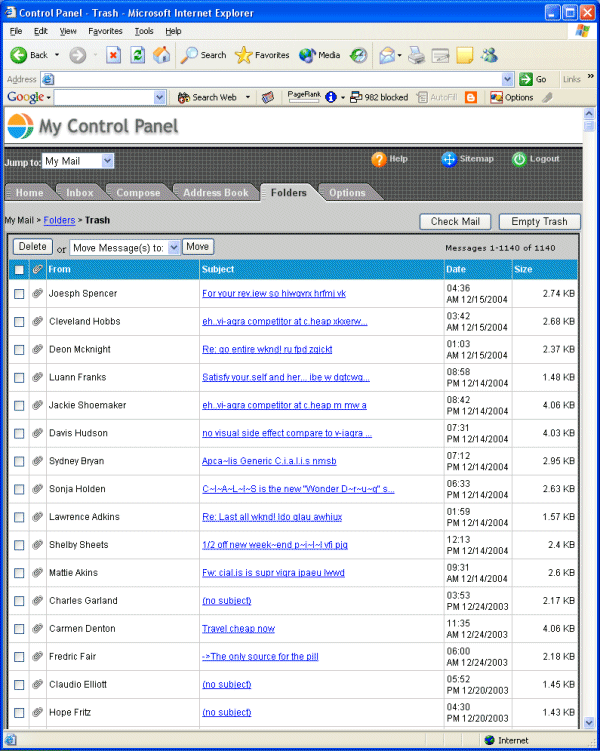
Note the number 1,140 in the upper left corner. That's a day's worth of filtered spam. Lots of other spam makes it through the filter, but this is better than nothing.
Spam filtering is the only way to preserve sanity, and the spam filtering is done on the server with SpamAssassin. The spam is put into a trash folder on the server. Unfortunately, the trash folder does not empty automatically. The tool shown above is what you use to empty the trash, but it can only handle about 2,000 messages before it times out and gives up. On Leigh's server, that means you have to remember to empty the trash every day (yet another time-wasting computer maintenance activity) or you have a problem.
We had gotten lax on emptying the trash. It didn't seem to be hurting anything, but what was happening was that the Trash folder was accumulating tens of thousands of spam messages and consuming more and more disk space, until the 200MB limit was reached. The solution was to figure out what was happening, log in with telnet, search the directories for the offending trash file and delete it. Total time spent on this repair: about 15 minutes.
Speedy DNA tests
I guess I'm not the only one who had this question when I heard that Saddam's identity had already been confirmed through a DNA test. I was under the impression that it took about a week best case.
DNA test can be done in 12 hours
See also NPR : Chronology of Saddam Hussein's Capture
Computer Repair #7
[This post is part of an ongoing series of posts in December cataloging how much time I spend repairing the computers here in the Brain household.]
This dialog just popped up on my screen. It's been popping up pretty regularly lately. It's nice and cryptic, so I have no idea what it means. I've got other stuff I need to do right now, but this is another thing I will need to investigate at some point.
It's funny to be chronicling all of this -- here we are at repair #7 on December 15. I'm averaging about one problem every other day...
Cartoon Physics
Richy's Random Ramblings: Cartoon Physics
From the site:
- "Ever wondered what the laws of Physics that popular cartoon characters have to abide by are? Well, the research has been done and so I present the Cartoon Laws Of Physics."
Mr. Picassohead
Fun to try:
Mr. Picassohead
Take a look at the gallery if nothing else...
What is so fascinating about this site is that, because of the constraints and the context, ANYONE can create a respectable-looking piece of art with this program.
Computer Repair #6
[This post is part of an ongoing series of posts in December cataloging how much time I spend repairing the computers here in the Brain household.]
The kids (David, age 6, Irena, age 3, and the twins, age 19 months) enjoy playing computer games, and enjoy them enough that we decided to get them their own computer. I imagine that as the twins get older we will end up getting another kids computer as well. Dell has an ad in Parade magazine this week for a $499 machine (2.5 Ghz Pentium4, 40GB hard disk, and includes a 17" monitor), or you can build a barebones machine with a used monitor for about $350. At that price, it's easier to get another machine than to argue about "who gets the computer." The only problem is that you have to then start installing updates, and administrating the thing.
David got the game Roller Coaster Factory 3. He installed it on their machine. But when he tried to play it, it was sluggish beyond belief. He would move the mouse, and 5 seconds later the on-screen cursor would move. The minimum requirements for the game call for a Pentium2 at 400 Mhz, so it wasn't a processor issue. The game came with a help file, which had a troubleshooting section, and what it suggested was this:
- The game runs, but it is very slow:
Game performance may be increased by lowering its screen resolution. You do this from the Configuration Panel that appears before game loads. Choosing a lower resolution and lowering bit depth to 16bit can help increase game speed. As well as lowering the resolution the 'Roller Coaster Configuration' panel also has controls for using low res textures and raising or lowering the LOD (Level of Detail). Lowering the LOD on slower machines can benefit the speed of the game, although you will notice that the lower the LOD the less detailed your coasters will appear.
Choosing to use low res texures (Texture Detail - Low) can help speed up the game on machines with older video boards that have low video memory. Also when building your roller coaster try to spread it out across the landscape rather than make it wind around itself repeatedly.
The game runs OK, but it keeps juddering and slowing down sporadically:
This may be due to a slower processor or video board. Also if your PC is low on memory this may cause a problem. If you have less than 64Mb of RAM, you may suffer from sporadic slowdown. Try to make sure there are no other programs running in the background, also tasks running in windows' system tray can take up valuable system memory that the game may need to run smoothly, shut down as many of these as possible.
This is the point where you enter tech support hell. Computers are great when they they work, but when they do not work you often are stuck. See repair #1 for a demonstration.
I talked to several friends, and one of them asked about the drivers installed on the machine. When I installed XP, it had not said anything about drivers, and the machine worked. It worked fine for dozens of other kids games. Nonetheless, my friend suggested finding and installing drivers specific to the motherboard. It was a 2-hour process to find the drivers for that specific motherboard, but I did find them, they did install painlessly, and that did solve the problem. It is actually a very cool game and David loves it.
But it took about 4 hours to get it running, when you consider the diddling David and I did with the screen resolution, the time I spent talking to friends, and the time spent finding and installing the drivers. It seems like this issue (like repair #1) could have been solved in an automatic way. When XP installs (or when a new device like a printer plugs in) XP could query the motherboard or the device for its manufacturer and model number. Then XP could go to the manufacturer's Web site, look up the right driver and install it automatically. In this case, that sort of "automatic driver installation" feature would have saved 4 hours.
Sunday, December 14, 2003
Saturday, December 13, 2003
Before and after
This page shows the kinds of things you can do to enhance the look of a person in a photograph:
Photo Touch Up - Digital Makeup
It's interesting how big an effect little things can have.
Grow your own meat
Put it next to your bread machine on the kitchen counter:
Lab-grown steaks nearing the menu
Friday, December 12, 2003
If you are thinking about starting a business...
Programs to help budding entrepreneurs abound. The problem is, few people who are trying to start companies know anything about those programs or how to contact them
From the article:
- In Wisconsin, a state of about 5 million people, approximately 400 programs provide more than 700 distinct types of service for entrepreneurs. New Mexico, a state of 1.5 million, is reputed to have 150 separate programs. The widely known federally sponsored programs -- such as small-business development centers and Small Business Administration loan-guarantee programs -- are included in such counts, but many programs are privately sponsored or managed by state or local governments. The question is, who knows about them? With so many people interested in starting companies in the United States today, and with such an ample supply of programs, one might expect a flourishing, efficient match of clients with programs. The number of programs is flourishing, perhaps, but evidence of efficient matching is scant.
Computer Repair #5
[This post is part of an ongoing series of posts in December cataloging how much time I spend repairing the computers here in the Brain household.]
I use Microsoft Outlook as my email client. It connects to an IMAP email server. When the IMAP server becomes congested and slow, Outlook has problems. Eventually the Outlook application will completely hang, and the only way to fix it is to use Ctrl-Alt-Del to bring up the task manager and kill the application. This happens once or twice a week right now.
When Outlook crashes, there is an option to send an error report. Once the report is sent, this dialog pops up:
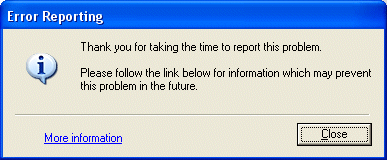
Clicking on the link brings up this screen:
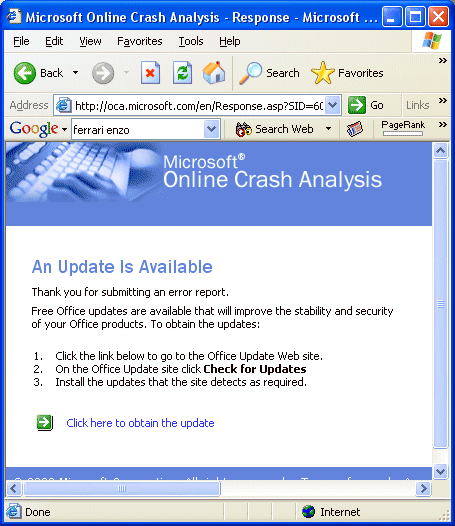
That sounds like just what I need, so I click and get to here eventually:
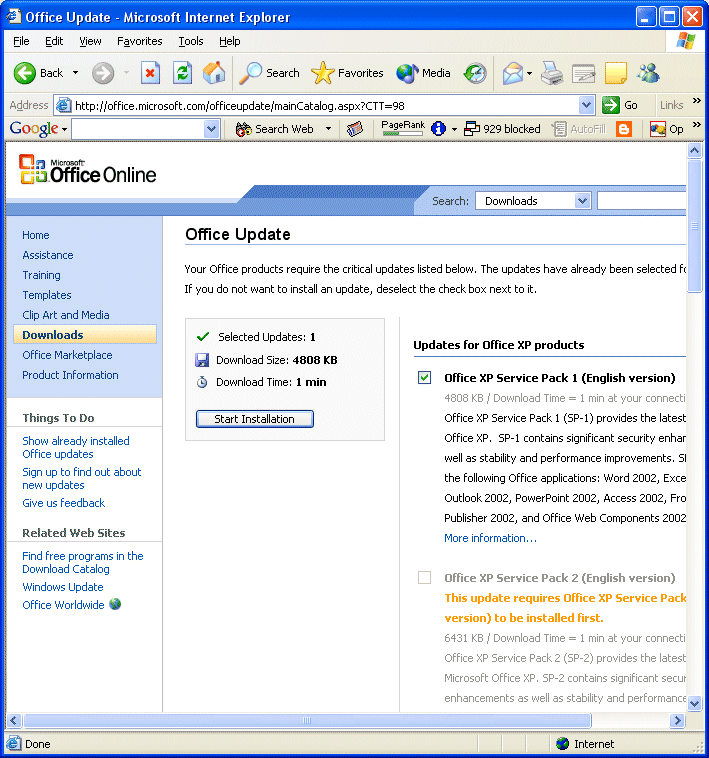
Note that in the right-hand column there are a number of different service packs, patches and updates. Currently there are nine, totaling about 20 megabytes, and they have to be installed in stages. Here they are:
- Office XP Service Pack 1 (English version)
0 KB / Already Downloaded
4808 KB / Download Time = 1 min at your connection speed
Office XP Service Pack 1 (SP-1) provides the latest updates to Office XP. SP-1 contains significant security enhancements, as well as stability and performance improvements. SP-1 updates the following Office applications: Word 2002, Excel 2002, Outlook 2002, PowerPoint 2002, Access 2002, FrontPage 2002, Publisher 2002, and Office Web Components 2002.
More information...
Office XP Service Pack 2 (English version)
This update requires Office XP Service Pack 1 (English version) to be installed first.
0 KB / Already Downloaded
6431 KB / Download Time = 1 min at your connection speed
Office XP Service Pack 2 (SP-2) provides the latest updates to Microsoft Office XP. SP-2 contains significant security enhancements as well as stability and performance improvements. SP-2 updates the following Office applications: Word 2002, Excel 2002, Outlook 2002, PowerPoint 2002, Access 2002, FrontPage 2002, Publisher 2002, and Office XP Web Components.
More information...
Office XP Security Patch: KB822036
This update requires Office XP Service Pack 2 (English version) to be installed first.
0 KB / Already Downloaded
663 KB / Download Time = < 1 min at your connection speed
The Office XP Security Patch: KB822036 offers the highest levels of stability and security available for Microsoft Office XP. This update is part of Microsoft’s continued effort to provide the latest product updates to customers.
More information...
Word 2002 Security Patch: KB830346
This update requires Office XP Service Pack 2 (English version) to be installed first.
0 KB / Already Downloaded
1468 KB / Download Time = < 1 min at your connection speed
This update addresses a flaw when opening a document containing certain data values (the names of macros in the document) in Microsoft Word. This flaw could allow arbitrary code to run when Word tries to open a document containing maliciously crafted values. This update resolves this vulnerability so that files containing these values are handled appropriately.
More information...
Outlook 2002 Update: January 22, 2003
This update requires Office XP Service Pack 2 (English version) to be installed first.
0 KB / Already Downloaded
456 KB / Download Time = < 1 min at your connection speed
The Outlook 2002 Update: January 22, 2003 offers you the highest levels of stability and security available for Microsoft Outlook 2002. This update is part of Microsoft's continued effort to provide the latest product updates to customers.
More information...
Excel 2002 Security Patch: KB830350
This update requires Office XP Service Pack 2 (English version) to be installed first.
0 KB / Already Downloaded
3885 KB / Download Time = < 1 min at your connection speed
Under certain scenarios it is possible for an Excel file to be modified in such a way that macro consisting of Excel 4.0 Macro Language (XLM) commands could run with no warning issued. This update resolves that vulnerability so that the appropriate macro blocking or warnings are triggered.
More information...
Office XP Web Services Update: KB812708
This update requires Office XP Service Pack 2 (English version) to be installed first.
0 KB / Already Downloaded
509 KB / Download Time = < 1 min at your connection speed
Office XP Web Services Update: KB812708 offers the highest levels of stability and security available for Microsoft Office XP applications and SharePoint Team Services. This update applies to Office XP, Access 2002, Excel 2002, FrontPage 2002, Outlook 2002, PowerPoint 2002, Word 2002, Publisher 2002, and SharePoint Team Services from Microsoft.
More information...
Office XP WordPerfect 5.x Converter Security Patch: KB824938 (English version)
This update requires Office XP Service Pack 2 (English version) to be installed first.
0 KB / Already Downloaded
174 KB / Download Time = < 1 min at your connection speed
This update provides you with the latest version of the Microsoft Office XP WordPerfect 5.x Converter and offers the highest levels of stability and security available for the Office XP WordPerfect 5.x Converter.
More information...
Access 2002 Snapshot Viewer Security Patch: KB826293 (English version)
This update requires Office XP Service Pack 2 (English version) to be installed first.
0 KB / Already Downloaded
30 KB / Download Time = < 1 min at your connection speed
This update provides you with the latest version of the Microsoft Access 2002 Snapshot Viewer and offers the highest levels of stability and security available for the Access 2002 Snapshot Viewer.
More information...
I click the button to start the installation of the first stage. Before I can install there is the obligatory EULA, in French and English (I mentioned earlier that I do not know French, so Microsoft can put anything in that section of the EULA and how will I know?):
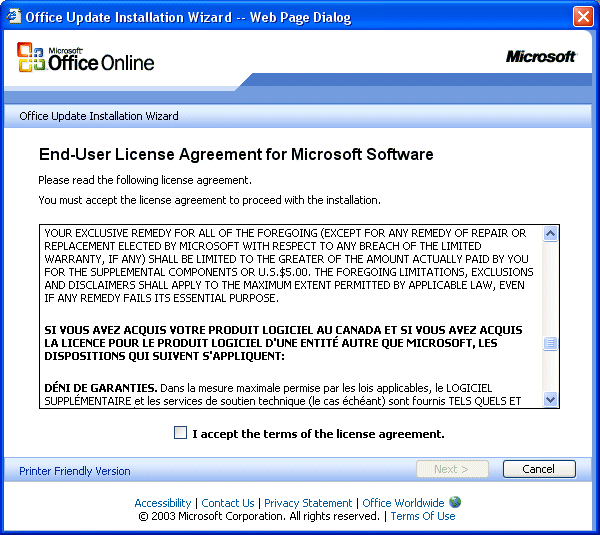
And then there is a 5-step process to download and install, which leads me to this screen:
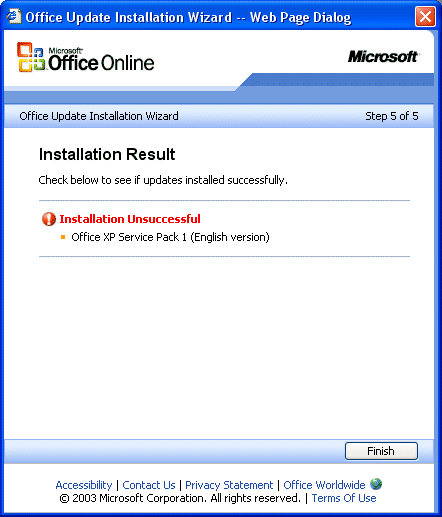
Now what? I make sure I've disabled my virus software. I have plenty of disk space. The network is working fine. What do I do now? Since this happens once or twice every week, I've tried it several times. It has never worked. It would be great if there were a phone number, an email address or something that would tell me where I can ask a question about this. Total time wasted on this problem so far: several hours.
Thursday, December 11, 2003
Computer Repair #4
[This post is part of an ongoing series of posts in December cataloging how much time I spend repairing the computers here in the Brain household.]
Today there is another update for Windows XP:
- Security Update for Windows XP (KB810217)
Download size: 1.4 MB, < 1 minute
A security issue has been identified in FrontPage Server Extensions. This vulnerability could allow an attacker to run code of their choice on your system. You can help protect your computer by installing this update from Microsoft. After you install this item, you may have to restart your computer. Once you have installed this item, it cannot be removed. Read more...
There's another End User License Agreement. The system downloads the 1.4 megabyte patch, and then it installs in about 3 minutes. It does not ask me to restart, so this is pretty quick. Maybe 5 minutes. Then multiply that by the other machines -- total time spent on this repair will be about 20 minutes.
Comments on 'A day at the hospital'
There were a number of comments from readers on the post entitled A day at the hospital. This excert is typical of the negative responses:
> $10,000 times 1 billion is $10 trillion dollars, or
> approximately the GDP of the entire United States.
> So if all economic activity in the U.S. were
> magically showered on the third world, you could
> lift one billion people into mild poverty instead
> of extreme poverty, for a year. Next year, you'd
> need to do it again. And there would be another
> billion people who you hadn't even touched.
This is mathematically correct. As the author points out, this solution does not accomplish anything beyond year one. Therefore, this is not a good solution, and we reject it. That does not mean that there is not a good solution available.
Here is a different way to think about the problem. Look at the process we are using today in Iraq. All told, we will end up spending $200 billion (probably more) in Iraq on the war and reconstruction. Iraq has about 24 million people. If we round things off, we are spending about $10,000 per person.
$200+ billion is our expected total investment to free, reconstruct and democratize the country. Having made that investment, we expect Iraq to become self sufficient. We do not expect to spend $200 billion in Iraq every year for eternity. The goal is for Iraq to develop a self-sustaining economy from a one-time investment of $200 billion. We expect democracy and capitalism to take root, and for Iraq to turn into a free and prosperous nation.
Iraq has been an extremely inefficient process because it is the first time we have tried to comprehensively transform a nation's government and economy. We've made a lot of mistakes, but we have also learned a lot. As we gain experience, let's say we can lower the cost of transforming a nation and its economy down to $1,000 per citizen. In that case, we could invest $200 billion and completely transform the lives of 200 million people in the third world per year. In just 15 years, the third world problem would be well on its way to extinction. Three billion formerly-impoverished people would be living in transformed economies that mirror the successful economies of the world's developed nations. In addition, we would be increasing the size of the world economy dramatically by turning three billion impoverished and unproductive people into middle class citizens. Everyone would win. The process would not be instantaneous, but we would be well on our way to a true solution.
Transforming the lives of three billion people who are currently living in abject poverty would be a significant accomplishment. It is not impossible. We should take up the challenge.
- 05/01/2003 - 06/01/2003
- 06/01/2003 - 07/01/2003
- 07/01/2003 - 08/01/2003
- 08/01/2003 - 09/01/2003
- 09/01/2003 - 10/01/2003
- 10/01/2003 - 11/01/2003
- 11/01/2003 - 12/01/2003
- 12/01/2003 - 01/01/2004
- 01/01/2004 - 02/01/2004
- 02/01/2004 - 03/01/2004
- 03/01/2004 - 04/01/2004
- 04/01/2004 - 05/01/2004
- 05/01/2004 - 06/01/2004
- 06/01/2004 - 07/01/2004
- 07/01/2004 - 08/01/2004
- 08/01/2004 - 09/01/2004
- 09/01/2004 - 10/01/2004
- 10/01/2004 - 11/01/2004
- 01/01/2005 - 02/01/2005
- 02/01/2005 - 03/01/2005
- 03/01/2005 - 04/01/2005
- 04/01/2005 - 05/01/2005
- 05/01/2005 - 06/01/2005
- 06/01/2005 - 07/01/2005
- 07/01/2005 - 08/01/2005
- 08/01/2005 - 09/01/2005
- 09/01/2005 - 10/01/2005
- 10/01/2005 - 11/01/2005
- 11/01/2005 - 12/01/2005
- 12/01/2005 - 01/01/2006
- 02/01/2006 - 03/01/2006
- 03/01/2006 - 04/01/2006
- 04/01/2006 - 05/01/2006
- 05/01/2006 - 06/01/2006
- 06/01/2006 - 07/01/2006
- 07/01/2006 - 08/01/2006
- 08/01/2006 - 09/01/2006
- 09/01/2006 - 10/01/2006
- 10/01/2006 - 11/01/2006
- 11/01/2006 - 12/01/2006
- 12/01/2006 - 01/01/2007
- 01/01/2007 - 02/01/2007
- 02/01/2007 - 03/01/2007
- 03/01/2007 - 04/01/2007
- 05/01/2007 - 06/01/2007
- 07/01/2007 - 08/01/2007
- 09/01/2007 - 10/01/2007
- 07/01/2008 - 08/01/2008
 RSS
RSS

 MB's Blog Home